
Last updated 19 October 2026
A custom job management app is software built around how your trade or field service business actually works, from the first call or online booking to quoting, scheduling, the job itself, invoicing and getting paid. For many Australian plumbers, electricians, builders, HVAC and cleaning businesses, off-the-shelf job management software does the job well. But once you grow, specialise or start working around the software instead of with it, building your own can be the smarter long-term move.
This guide explains when off-the-shelf tools are enough, the 7 signs it’s time to build, what a custom app should include, how the costs compare, and how to build one without disrupting your crews.
In this guide
- What job management software does
- When off-the-shelf tools are enough
- 7 signs it’s time to build your own
- Off-the-shelf vs custom: side by side
- The real cost over five years
- Features to include
- Integrations that matter in Australia
- Offline use, safety and privacy
- The hybrid option
- How the build works
- Questions to ask a development partner
- Mistakes to avoid
- Frequently asked questions
What job management software does for trades and field services
Construction alone is a huge, small-business industry. Master Builders Australia counts 462,939 construction businesses employing 1.32 million people, and more than 98.6% of those businesses have fewer than 20 staff. Add plumbing and electrical maintenance, HVAC, pest control, cleaning, security, solar and appliance repair, and you have hundreds of thousands of businesses running jobs in the field every day.
Job management software ties that work together. A typical system covers:
- Enquiries and bookings from phone, email, web forms and online booking;
- Quotes and estimates, often with price lists and materials;
- Scheduling and dispatch, so the right tech goes to the right job at the right time;
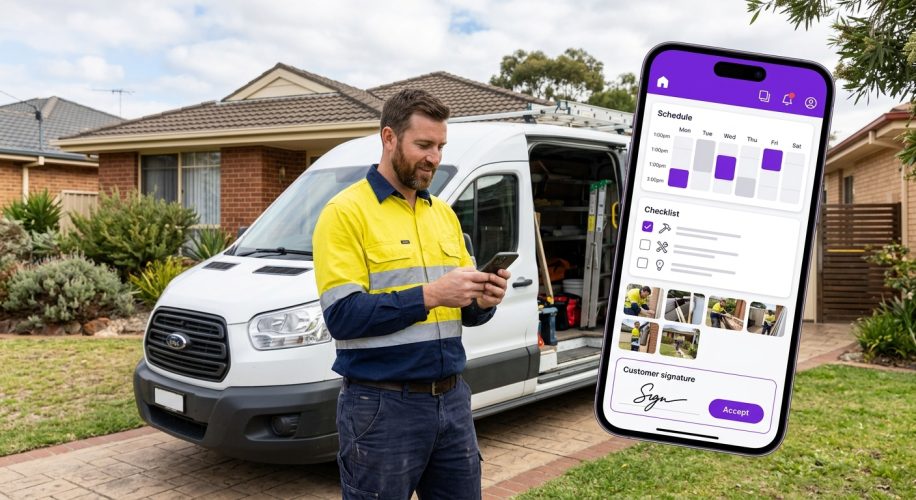
- A mobile app for the field with job details, photos, notes, forms and customer signatures;
- Timesheets and job costing, comparing quoted and actual labour and materials;
- Invoicing and payments, usually synced with accounting software; and
- Customer history, so anyone in the office can see every past job at an address.
When off-the-shelf job management software is enough
Ready-made apps such as ServiceM8, Tradify, Fergus, simPRO and AroFlo are popular in Australia for good reason. They’re quick to set up, cost a predictable monthly fee and cover the standard quote, schedule, job and invoice workflow very well.
Stick with off-the-shelf software if:
- your workflow is close to the standard trade workflow;
- you have a small team and don’t expect fast growth;
- the integrations you need already exist;
- you’re happy to adjust some processes to suit the software; and
- your current tool isn’t limiting your growth, service or margins.
If that’s you, building your own is unlikely to pay off yet. The rest of this guide is for businesses where the software has started to hold them back.
7 signs it’s time for a custom job management app
1. Your team works around the software every day
Spreadsheets on the side, double entry, paper forms photographed and uploaded, WhatsApp groups for job updates. When staff keep inventing workarounds, the software no longer matches how the business runs, and every workaround costs time and causes errors.
2. Your workflow is your competitive advantage
Maybe you run planned maintenance contracts for strata, handle insurance repair work with strict reporting, manage multi-stage builds, or offer a service process customers love. Generic software flattens those differences. A custom job management app lets you build your best process into the system so every tech follows it.
3. Per-user fees are climbing as you grow
Many tools charge per user each month. That’s cheap for five people and expensive for fifty, especially when you add office staff, subcontractors and apprentices who only need limited access.
4. You need integrations that don’t exist
Builders’ and insurers’ portals, a supplier’s ordering system, your own customer portal, IoT sensors on equipment, a specialised compliance system or a fleet tracking tool. When the integration you need isn’t available, staff end up copying data between systems by hand.
5. Compliance and reporting take too long
Safe work method statements, test and tag records, gas and electrical certificates, before-and-after photos, client-specific reports. If compiling paperwork takes hours per job, a purpose-built app can capture it once in the field and produce reports automatically.
6. You want to offer customers something better
Live job tracking, a portal where property managers book and approve work, maintenance history for each asset, or a branded app for repeat clients. These features can set you apart, but they’re difficult to add to someone else’s product.
7. You want to own the system and your data
With subscription software, the vendor decides pricing, features and roadmap. A custom job management app is an asset your business owns. You control what’s built next, where your data is stored and how it’s used, and it adds value if you ever sell the business.
Off-the-shelf vs custom job management app
| Off-the-shelf software | Custom job management app | |
|---|---|---|
| Time to start | Days | A first version in about 3–6 months |
| Upfront cost | Low | Higher, paid as a project |
| Ongoing cost | Monthly fee, often per user | Hosting, support and improvements, not per user |
| Fit with your workflow | You adapt to the software | Built around your process |
| Integrations | Only what the vendor supports | Whatever your business needs |
| Branding | The vendor’s | Your own app and customer portal |
| Ownership | You rent access | You own the system |
| Best for | Small teams with standard workflows | Growing or specialised businesses |
The real cost over five years
Comparing a monthly subscription with a one-off build is misleading. Compare the total cost over five years, and include the hidden cost of workarounds.
Here’s an illustrative example. Suppose a business has 30 users on software costing $60 per user per month, excluding GST:
- That’s $1,800 a month, or $21,600 a year.
- Over five years it’s $108,000, before any price rises, add-ons or extra users.
- If the team grows to 50 users, the five-year total moves towards $180,000.
Now add the hidden costs. If eight staff each lose 30 minutes a day to double entry and workarounds, that’s around 1,000 hours a year of paid time doing admin instead of billable work.
A custom build has a larger upfront cost, then ongoing hosting, support and improvements that don’t rise with every new user. For a growing team, the costs often cross over within a few years, and the efficiency gains are on top of that. For a small team with a standard workflow, they usually don’t, which is why off-the-shelf software is the right answer for many businesses.
Every business is different, so get a quote based on your actual scope and compare it with your real subscription and workaround costs.
Features to include in a custom job management app
Start with a focused first version that solves your biggest problems, then add features as your team uses it.
Core features
- Customers, sites and assets, with full job history at each address
- Enquiries, quotes and estimates with your own price book and templates
- Drag-and-drop scheduling and dispatch, with travel time and skills matching
- A field app with job details, checklists, photos, notes and customer sign-off
- Timesheets, materials used and real-time job costing
- Invoicing and payment collection on site or by link
- Automatic SMS or email updates, such as “your tech is on the way”
Features that set you apart
- A customer or property manager portal for bookings, approvals and reports
- Recurring maintenance contracts with automatic job creation
- Digital compliance forms, certificates and safety documents
- Asset and equipment tracking with service history and QR codes
- Stock and van inventory, with purchase orders to suppliers
- Dashboards for profit per job, tech utilisation and first-time fix rate
- Route optimisation and live location for dispatchers
Choosing between native and cross-platform for the field app matters for offline performance and cost. Our guide to native vs cross-platform app development explains the trade-offs.
Integrations that matter in Australia
- Accounting: two-way sync with Xero or MYOB for invoices, payments, customers and payroll.
- Payments: card payments on site, payment links and direct debit for maintenance contracts.
- Suppliers: price lists and ordering with your wholesalers, so quotes use current prices.
- Maps and fleet: address lookup, travel times, routing and vehicle tracking.
- Communication: SMS, email and WhatsApp updates to customers.
- Client portals: builders’, insurers’ or facility managers’ systems where you receive and report on work.
- Your website: online booking forms that create jobs automatically.
Offline use, safety and privacy in the field
A field app has to work where your techs work: basements, plant rooms, rural properties and new estates with poor coverage. Make sure your app:
- works offline and syncs automatically when the connection returns;
- captures safety documents, such as safe work method statements for high-risk construction work, with sign-off from each worker;
- stores photos and signatures securely, linked to each job as evidence;
- controls access by role, so subcontractors only see their own jobs; and
- protects customer data, with encryption, backups and a clear record of where data is stored.
On privacy, the Office of the Australian Information Commissioner explains that small businesses with annual turnover of $3 million or less are generally exempt from the Privacy Act, with some exceptions. Businesses above that threshold are covered, and privacy reforms continue. Either way, you hold customers’ names, addresses, phone numbers and photos of their homes, so building in good privacy practice from the start is simply good business. If you use automation to make decisions about customers, our guide to the Privacy Act’s automated decision-making rules is worth reading.
The hybrid option: build only what’s missing
You don’t always have to replace everything. Many businesses keep their accounting software and sometimes even their existing job tool, and build only the missing pieces:
- a customer portal that connects to your existing system;
- a custom compliance or inspection app that feeds results back into your jobs;
- an integration that removes double entry between two systems; or
- a reporting dashboard that pulls data from all your tools into one view.
This approach costs less, delivers results faster and is a good way to test the value of custom software before committing to a full build.
How building a custom job management app works
- Discovery (2–4 weeks). We ride along with your techs, sit with your office team, map how jobs flow today and agree what the first version must do.
- Design (2–4 weeks). Clickable prototypes of the field app and office screens, tested with real staff before any code is written.
- Build in sprints. Working features every two weeks, so you see progress and can change priorities as you go.
- Data migration. Customers, sites, assets, price lists and open jobs moved across from your current system.
- Pilot. One crew or one branch uses the app first, and we fix issues before everyone switches.
- Rollout and support. Training for office and field staff, then ongoing support and improvements.
A focused first version usually takes about three to six months, depending on scope and integrations. Larger platforms are built in stages over a longer period.
Questions to ask a development partner
- Have you built field service or job management software before, and can we see it working on a phone?
- How will you learn how our jobs run in the field, not just in the office?
- How does the app handle poor or no mobile coverage?
- Which integrations have you built with Xero, MYOB, payment providers and suppliers?
- Who owns the source code and our data, and where will the data be hosted?
- How do you migrate our customers, sites, assets and open jobs?
- What does support look like after launch, and how quickly do you respond to problems?
- How will you price the project, and what’s included in ongoing costs?
Clear answers to these questions tell you more about a partner than a polished proposal. Ask for references from businesses with field teams similar to yours.
Mistakes to avoid
- Building everything at once. Start with the features that save the most time, then expand.
- Designing without your techs. If the field app is slow or confusing, people won’t use it. Involve the people who’ll use it daily.
- Ignoring offline use. An app that fails without signal will be abandoned on the first job in a basement.
- Underestimating data migration. Clean up customer and asset data before you move it.
- Not owning the code. Make sure your contract gives you ownership of the source code and your data.
- Forgetting support. Plan for updates, phone operating system changes and new features after launch.
How Microweb Global can help
Microweb Global designs and builds custom software and mobile apps for Australian businesses, including field service software for trades, maintenance and service teams. We’ve delivered more than 200 projects since 2020, and our process starts with understanding how your jobs actually run, not with a template.
We can build a complete custom job management app, a customer portal, a compliance app or the integrations that connect the tools you already use. Learn more about our custom software development and mobile app development services, or read our guide to outsourcing software development if you’re weighing up your options.
Custom job management app: frequently asked questions
What is a custom job management app?
A custom job management app is software built specifically for your trade or field service business to manage enquiries, quotes, scheduling, field work, timesheets, invoicing and customer history, designed around your own workflow rather than a generic one.
When should a trade business build its own job management software?
Consider building when your team relies on workarounds, your workflow is a competitive advantage, per-user fees are climbing, the integrations you need don’t exist, compliance reporting takes too long, or you want to own the system and your data.
How long does it take to build a custom job management app?
A focused first version usually takes about three to six months, including discovery, design, development in sprints, data migration and a pilot with one crew. Larger platforms are built in stages over a longer period.
Is a custom job management app cheaper than a subscription?
Not always. For small teams with standard workflows, off-the-shelf software is usually cheaper. For growing or specialised businesses, a custom app can cost less over five years because its costs don’t rise with every user, and it removes time lost to workarounds.
Can a custom job management app integrate with Xero or MYOB?
Yes. A custom app can sync invoices, payments, customers and timesheets with Xero or MYOB, and connect to suppliers, payment providers, maps, SMS and client portals.
Will the app work without mobile coverage?
It should. A good field app stores job details, photos, forms and signatures offline and syncs automatically once the connection returns, which is essential on rural sites, basements and new estates.
Do I own the app and the data?
You should. Make sure your development contract gives your business ownership of the source code and all data, so you can control the roadmap and move providers if you ever need to.
Talk to us about your job management app
Tell us how your business runs jobs today and where the software holds you back. We’ll tell you honestly whether off-the-shelf, a hybrid approach or a custom build makes most sense.
Sources
- Our industry, Master Builders Australia
- Opting in to the Privacy Act, Office of the Australian Information Commissioner
- Safe work method statements, WorkSafe Queensland
- Digital tools for business, business.gov.au